)
)
Key takeaways
Ask AI answers questions about your live Teamwork.com data in plain language, no report-building required.
It doesn't stop at the answer: you can act on it immediately, from the same conversation.
It only ever sees what you already have access to, confirms before it changes anything, and your data is never used to train AI models.
Whatever you need to know is already in Teamwork.com: resourcing, budgets, task status, all of it live. The only question is how many clicks stand between you and it. Ask AI removes them: ask what you'd ask a colleague, typed or said out loud, and get the answer straight from your own data. It's just as useful whether you live in Teamwork.com every day and want the fast route past a report you could otherwise build, or you're new to the platform and wouldn't know where to start looking in the first place.
Curious how it actually works? Watch it in action:
Transcript for the video 'Ask AI':
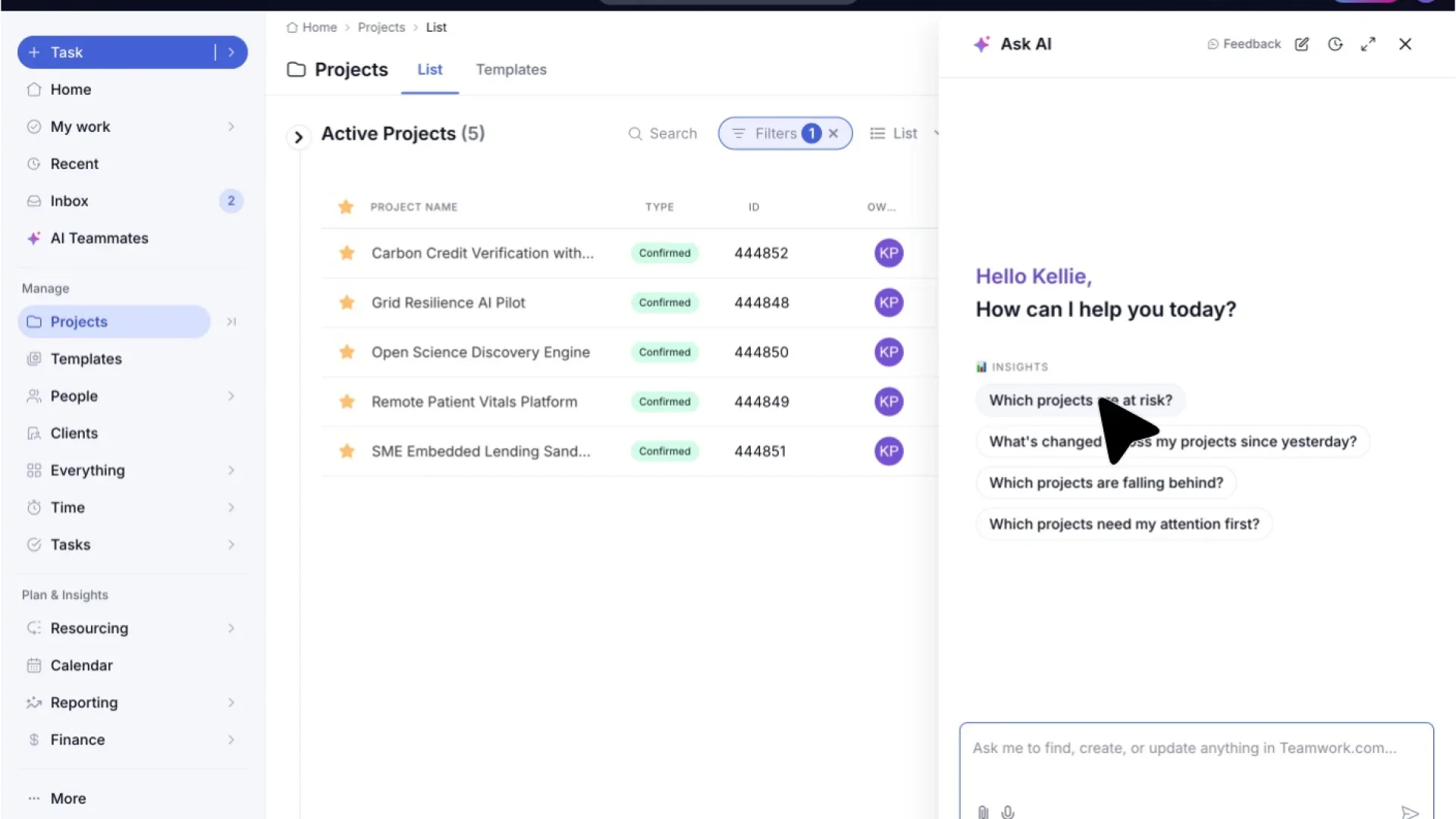
Today, we are taking a look at Teamwork dot com's Ask AI. Ask AI is built directly into your Teamwork dot com site, giving it the ability to view all of your data without manual input from you. Let's open up your Teamwork dot com site. You will find the Ask AI button in the menu bar at the top right of your page. Let's go through the options on the Ask AI modal. Expanding Ask AI to full screen gives you a bigger workspace to review everything the assistant surfaces. And just as easily, you can collapse it back down into a side panel whenever you wanna keep an eye on your project list at the same time. If you ever wanna pick up where you left off, recent chats keeps a history of every conversation you've had with the assistant. But right now, let's start fresh. Clicking start new chat gives us a clean slate to ask a new question. Ask AI will give you some prompts to choose from, such as what projects are at risk right now, or else you can use the text box or the voice dictation option to enter your own text. Ask AI follows your existing Teamwork dot com permissions. It cannot show information or complete an action that you could not otherwise access or complete. For this example, I have used one of the prompts to ask it which of my projects are at risk. Once it has searched through your data, it will provide an answer and then give you follow-up actions based on what it has found. For this one, I want to assign owners to my open tasks. In the background, the AI is now working through the remote patient vitals platform project, matching up open tasks with the right owners. Let's try another type of question. Here, I have asked where my team logged the most time last quarter to get a sense of where everyone is spending the most time. And here's the full breakdown. Hours logged per project last quarter, showing you exactly where your team's time actually went. Let's start a new chat again and move on to one more example of what this assistant can do. For this example, I have asked it a question about how to create a dependency task. Ask AI can answer product questions using Teamwork dot com help center content. Ask where to find a feature, how a setting works, or how to complete a workflow. And that's it. Ask AI, your built in AI assistant. Spend less time managing work and more time doing it. Why not ask it a question now?
Getting a real answer, without building a report
Ask "how much budget is left on the projects due this week," and Ask AI pulls the number from live time and cost data, not a snapshot from last week, and links straight back to the underlying project so you can check the details yourself. Ask who's over or under capacity today, and you get specific people and their available or allocated hours, not just a general "the team's stretched." Ask where a task or a comment lives, and it finds it even if you couldn't remember which project it was buried in.
That's what makes the answers real rather than generic: Ask AI isn't guessing from a support article. It’s a real-time snapshot of how your business is operating, pulled from your actual projects, budgets, and time logs as they stand right now.
The part that's actually new: acting on what you just learned
Ask AI doesn't stop at the answer. A few examples of what you can do with it right there in the conversation:
A project's slipping. Draft the update to the client or the team right there, without switching to a different tab to write it.
The timesheet's a mess. Tell it what you worked on and when, across several tasks or several days, in one request, instead of filling it in entry by entry. It reads the entries back to you before saving anything, so a bulk request doesn't mean bulk mistakes.
Someone's over capacity. Reassign the work, or follow up on a specific task, from the same thread that told you the problem existed.
And it's not limited to those three. The same create-edit-approve ability works across almost any Teamwork.com object: tasks, projects, milestones, messages, notebooks, comments and time logs, so the fix is rarely more than one more request away from the answer that surfaced it.
)
It only knows and does what you're already allowed to do
None of this reaches further than you already can. Ask about a project you don't have access to, and it won't show up in the answer at all, not partially, not redacted, just absent, the same as if you'd tried to find it manually. Try to take an action outside your permissions, like editing a task you don't own, and Ask AI declines and explains why, rather than quietly failing or, worse, doing it anyway. And none of what you ask or share is used to train AI models.
That's the whole shift: not a smarter search bar, but the search and the fix in the same breath. It lives in a slide-out drawer wherever you're already working in Teamwork.com, complete with suggested questions on your busiest pages so you're never staring at a blank box, and it remembers your last conversation and panel size, so picking up a thread doesn't mean starting over.
Ask AI is currently in Early Access, with a broader rollout planned. However you use Teamwork.com today, it's worth trying with the question you'd normally build a report to answer.
)
)
)
)
)
)
)
)